What this article covers
Ads often show a Telegram bot like a product with one clear price. In practice, it is almost always custom work. The same chat buttons can cost very little or a lot, because the logic, integrations, and responsibility behind them are not the same.
Here is a simple map for buyers. First, we explain what moves the estimate the most. Next, we contrast a light bot with a serious build. We also cover why teams often need an admin panel, and what ongoing support looks like after launch.
Need an estimate for your use case?
Tell us the scenario and your timeline. We will reply with a realistic range and a clear next step.
Discuss the projectWhy you cannot price “a bot” as one thing
A Telegram bot is not a single boxed product. It is a way to automate chat and actions inside a messenger. Therefore, two “bots” can look alike in a pitch deck and still be worlds apart under the hood.
For example, one project might be a short Q&A flow. Another might be a storefront with payments, user accounts, and sync to a CRM, warehouse, or in-house accounting tool. A third might be an internal app for staff with roles, audit logs, and strict access rules.
So when someone asks, “How much does a bot cost?”, a fair answer starts with questions. Who uses it? What steps do they take? Which systems join the flow? What counts as failure? Finally, what does “done” look like on day one?
What usually shapes the number
What affects cost the most
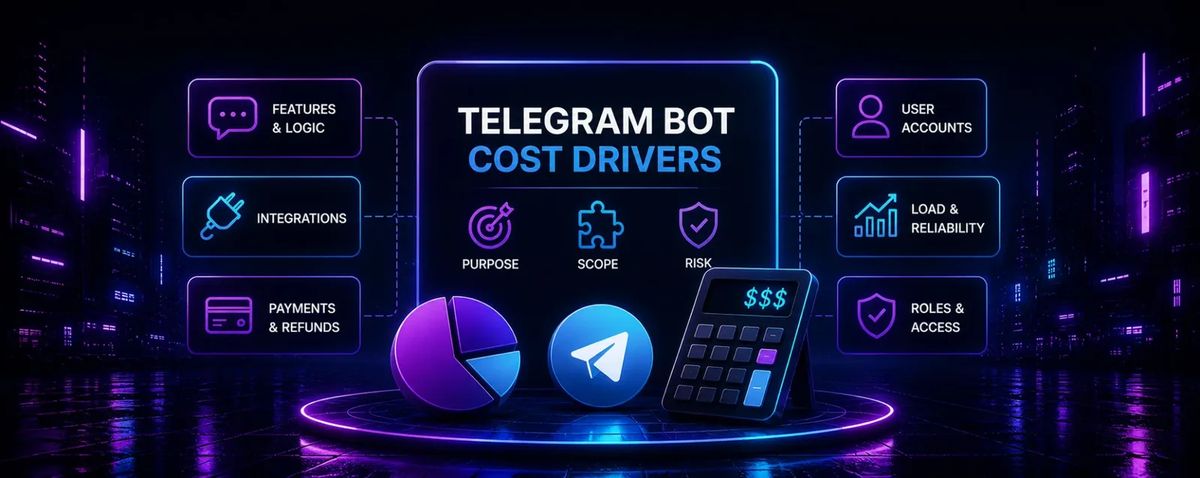
If you group the usual budget drivers, you end up with six big buckets.
Features and logic
Branches, checks, reminders, broadcasts, and multiple languages add up fast. Even a simple rule like “if the user does A, offer B after a day” needs a clear spec, code, and tests.
Integrations
Hooking the bot to a CRM, ERP, Google Sheets, email, warehouse, or custom DB is its own project slice. You need access, stable data formats, and a plan for retries when a service hiccups.
Payments and refunds
Money touches legal detail. Think receipts, order states, refunds, reconciliation, and sometimes subscriptions with recurring charges.
Personal accounts
Order history, balances, files, and support tickets turn chat into a small product. You now own storage, screens, and navigation, not just messages.
Load
A quiet pilot and a viral spike need different designs. Queues, monitoring, and spare capacity matter when traffic jumps.
User roles
Customers, managers, partners, and admins each follow different paths. Each role also needs its own guardrails when something goes wrong.
Simple bot vs. complex project
A simple bot stays inside a tight script. You get a few clear steps, short copy, buttons, and maybe a lead form that emails a sheet. The build stays fast when you freeze the text early, keep edge cases small, and skip deep ties to finance systems.
A complex project tracks a real process. You layer statuses, approvals, rights, reports, integrations, and data rules on top of chat. It may still look like two or three Telegram screens. However, the team must ship a rules engine, history, duplicate checks, and graceful behavior when an outside API goes down.
Checklist: light scope vs. heavy scope
Simple scope
- Short flow, not a maze of branches
- Few outside tools, or very plain ones
- No need for deep roles or audit trails
- Modest expectations for peak traffic
Complex scope
- Many states (“created”, “paid”, “in delivery”, and more)
- Several integrations with strict data rules
- Payments, documents, user areas, admin tools
- You need calm behavior during outages and growth
Why bots that look the same can cost differently
Most Telegram UIs feel familiar: text, buttons, maybe a photo and a menu. Users rarely see the engineering behind those taps.
Same form, two backends
Picture two bots that both collect a lead. In the first, rows land in a spreadsheet and the story ends there.
In the second, the bot checks the phone for duplicates, pulls the client from a CRM, opens a deal on the right stage, and routes an alert to the next free owner. From the outside, both paths look like “one form”. In reality, the second team carries more risk if anything breaks.
Quality is the quiet multiplier. Strong error text, edge-case handling, tap protection, and logs for postmortems rarely wow a demo. Still, they drive both price and how calm you feel after go-live.
What the customer sees
Familiar messages and buttons, plus the odd image. Small gaps in polish often stay hidden until the first odd real-world case.
What is hidden in the logic
Validation, CRM hooks, notification queues, failure paths, permissions, and history. That stack is what usually separates a budget flow from a premium one.
Timeline and development cost
Your schedule sets how hard the team runs and how much rework you risk. As deadlines tighten, people cut discovery, test less, or run parallel workstreams. As a result, rush fees show up on the invoice.
Tight deadline
You trade time for money. Less room for questions and QA means you pay more for speed and for several specialists at once.
Rules “on the fly”
When product rules appear mid-build, expect change orders. Those hit the budget, the launch date, or both.
When the number stabilizes
Write down flows, integrations, and a shared “done” list. After that, the quote stops feeling like a guess.
Practical rule: lock the story, the systems, and the acceptance tests. If those keep shifting, any fixed price will crack.
Does the bot need an admin panel?
In short: not every bot needs one, yet many do.
Often the hard part is not the chat. It is everything you run around it: copy, users, orders, reference tables, broadcasts, manual fixes, and reports.
Even a lean admin UI saves you from SQL edits and daily “change this one line” pings. You buy back hours for the business. In addition, that panel is its own mini product with screens, roles, validation, and change history.
- Marketers update text and promos without a developer on call
- Each staff role sees only the actions you allow
- You dodge a pile of “ship this tonight” tickets right after launch
If you expect frequent tweaks to prices, offers, or team structure, bake admin work into v1. Otherwise a cheap bot can turn into a long chain of paid fire drills.
What can speed up or lower development cost
Mature libraries, standard login patterns, and battle-tested Telegram API habits shrink the early scaffolding. Templates for boring chores help too.
That approach works best when the use case is familiar and you already know the risks you accept.
Generic starter kits and “boxed” stacks can buy a fast week one. They struggle, however, with odd rules, rare integrations, or tight security needs. When the fit is unsure, plan for custom work up front instead of patching someone else’s shortcut for months.
On your side, solid prep also trims cost. Bring final-ish copy, a simple process map, system access, and a named owner for payment law and data policy.
Some tools let you snap blocks together in a browser with zero code. Demos look cheap and instant.
Live traffic tells a different story. You may hit the platform ceiling, bend a weird step with hacks, or discover the integration you need is missing or flaky. Every big change bumps into the same walls.
For a tiny survey or a digital business card, that trade can be fine. For money, inventory truth, and duty of care to users, the “savings” often move to stress and lost time. A purpose-built stack tends to feel steadier from day one.
What support costs after launch
Shipping is not the finish line. Plan for three ongoing cost types below.
Bots that touch cash or personal data need a runbook. Decide who owns alerts, how you log incidents, and how quickly you can ship a hotfix.
Growth work sits on its own line item: fresh promos, new statuses, another integration, another dashboard. You can fund each piece as its own task, but a yearly plan should still include a “change reserve”. Without it, the product freezes in place.
How to understand your project budget
Skip the one-line idea. Bring a tight brief instead. If you can answer the three blocks below, vendor talks move faster and stay closer to reality.
Flows
Clarify: who the user is, where the journey starts, which branches exist, and what “success” means.
Result: fewer assumptions and fewer painful rewrites mid-flight.
Data and systems
Clarify: where leads and payments land, which tools you already use, and how you want data cleaned or enriched.
Result: a clear integration scope and no fuzzy handoffs.
Launch criteria
Clarify: the target date, pilot vs. full rollout, expected traffic, and any reporting you need on day one.
Result: a timeline you can trust, without surprise phases.
Bottom line
A Telegram bot price is really the price of the job you need done, plus the risks you share: integrations, data, roles, payments, and life after launch. Counting buttons to guess cost is like valuing a car by its door handles.
Spell out the process, who owns what, and the load you expect. The budget band gets sharper, and you can pick a partner for fit, not only for the lowest bid.
Want an estimate without the noise?
Share the job in your own words. If you have links to similar products, add those too. We will propose a format, timing, and an itemized estimate that matches your real scope.
Share:
Need a bot for your business?
Submit a request and get a free consultation on automating your business